Building AI on an 8-bit Machine: A Throwback to Retro Coding
What if I told you that you could write AI code on a computer from nearly 40 years ago?🕹️

My 8-bit TK90X, a ZX-Spectrum clone.
In a world dominated by GenAI and LLM advancements, I decided to take a step back – way back – to the era of 8-bit computing. This journey isn’t just about nostalgia; it’s a deep dive into how early computing shaped the way we code today and a challenge to build AI on extremely limited hardware.
Want to see the code in action?
Watch the video here:
The 1980s: When Coding Was Pure Grit
Back in the ’80s, coding was all about being resourceful and passionate. Most kids (myself included) only had access to machines with minimal CPU, memory, and storage. Programming languages were basic, lacking the sophisticated frameworks, best practices, and powerful libraries we enjoy today. Every line of code had to count.
I still remember writing programs on this computer with just 48KB of RAM – yes, kilobytes! Sometimes, I’d wait up to 10 minutes for a program to load from an audio cassette tape. If you’ve never experienced that, don’t worry – the emulator I used recreates the full experience, including the nostalgic tape-loading sounds.
The Spark That Brought It All Back
Recently, I stumbled upon an awesome blog post about someone pushing the limits of retro graphics on that same old architecture. That sent me down memory lane, and I had one burning question:
💡 Could I write some very basic AI code on an 8-bit computer?
To find out, I dug through my garage and pulled out my old TK90X, a Brazilian ZX Spectrum clone. This little beast packs an 8-bit CPU running at 3.5 MHz with just 48KB of RAM – a true relic of the past!
Getting started on the TK90X itself was an absolute blast – typing in code, hearing the familiar keyboard clicks, and watching the screen light up with BASIC commands. But to expedite the development process and record the experience for the video, I switched to an emulator, which made it easier to capture everything while still preserving the authentic feel of coding on vintage hardware.
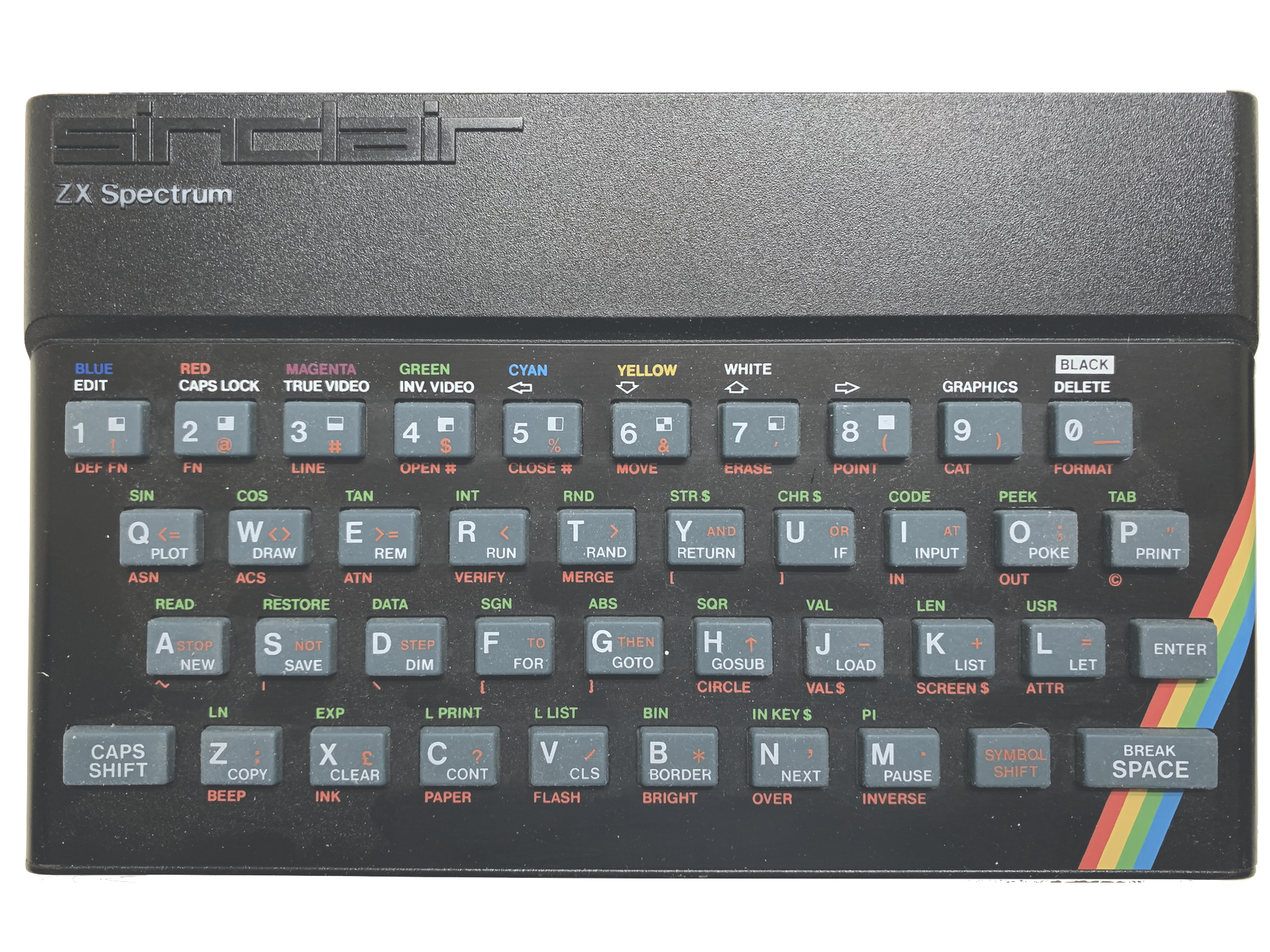
Interesting Fact: While unpacking the TK90X, I also managed to power up my original ZX Spectrum, and unsurprisingly, they both behaved almost identically. As I mentioned earlier, the TK90X, which was manufactured by Microdigital in Brazil, was a clone of the ZX Spectrum, originally produced by Sinclair Research in the UK. Note the word “clone” as, back in those days, importing foreign computers into Brazil was nearly impossible due to heavy government restrictions, so local companies created their own machines that copied borrowed heavily from the originals. But that’s a fascinating topic for another post! 😉
The Challenge: Teaching an Old Computer New Tricks
I decided to implement Perceptrons, the most fundamental type of artificial neural network. Perceptrons are a supervised learning algorithm used in machine learning to classify data with simple binary decisions – perfect for a machine with limited power!
Now, let’s be real: running a Perceptron on an 8-bit computer is a serious limitation. But at its core, AI is just math, and I wanted to prove that you could implement the basic logic of artificial neural networks on even the most primitive hardware.
The goal? To use Perceptrons to model simple logic gates (AND, OR, NOT) – the building blocks of computation.
What’s a Perceptron, Anyway?
A Perceptron is a simple, single-layer neural network that performs binary classification. It takes multiple inputs and outputs either a 0 or 1 – just like a logic gate. However, they have a key limitation: a single-layer Perceptron can only solve linearly separable problems. In other words, you cannot use it to solve a XOR logic gate, for example.
📌 Quick history:
Perceptrons were invented by Frank Rosenblatt in 1958 at the Cornell Aeronautical Laboratory.
The Math Behind It
At its core, a Perceptron assigns weights to each input to determine its importance. The formula is simple:
Weighted Sum = (w1 * x1) + (w2 * x2) + ... + (wn * xn) + b
Where:
x₁, x₂, ..., xnare the inputsw₁, w₂, ..., wnare the weightsbis the bias
The activation function then decides the output:
- If the weighted sum is greater than or equal to a threshold, the output is 1
- Otherwise, the output is 0
Training the Perceptron
During training, the weights adjust based on the error:
Error = Expected Output - Predicted Output
To update the weights, we use:
w(i) = w(i) + (learning rate * Error * x(i))
And for the bias:
b = b + (learning rate * Error)
Where the learning rate controls how much the model updates per iteration.
After enough training cycles (epochs), the Perceptron learns to classify inputs correctly
By the way, when training AI models, there are a few key parameters (called hyperparameters) that control the learning process:
- Number of Iterations (Epochs): This is how many times the algorithm processes the entire dataset during training. Each full pass is called an “epoch.”
- Learning Rate: This determines how quickly the model updates its weights based on the difference between predicted and expected values. It’s typically a value between 0 and 1, with lower numbers being preferred. Higher learning rates can risk overshooting the optimal weights.
- Bias: This helps adjust the model’s flexibility by shifting the linear function away from the origin (0,0), improving accuracy and preventing limitations in the model’s predictions.
AI Training on an 8-bit Machine? Challenge Accepted!
I wrote the Perceptron code in ZX Spectrum BASIC, allowing users to:
✅ Input training data in the source code file itself
✅ Select a logic gate (AND, OR, NOT) at runtime
✅ Watch as the program adjusts weights to learn the correct output

Want to Try It? Here’s the Code!
I’ve uploaded everything to my GitHub repo, including comments on ZX Spectrum-specific syntax.
Here’s the link: github.com/lessaworld/perceptron
To run the program like an actual cassette tape, you’ll need the bas2tap program whose job is to convert the file from Basic to a tape format. To do that, run the following command.
./bas2tap -a1 perceptron.bas
No ’80s Computer? No Problem!
Don’t have an old-school machine lying around? No worries!
There are free emulators that perfectly recreate the experience, down to the CRT screen effects and cassette loading sounds.
I used Retro Virtual Machine (RVM) – it’s hands down the best emulator for reliving the full ZX Spectrum experience.
Check out my YouTube video where I demonstrate the full experience of seeing the program loading and running.
Final Thoughts: The Beauty of Limitations
This experiment was a blast from the past, reminding me of a time when coding was as much about creativity and problem-solving as it was about raw computing power.
It’s incredible to see how far AI has come – from simple Perceptrons running on 8-bit machines to the massive LLMs powering today’s GenAI revolution.
Hope you enjoyed the journey!
Cheers!
Andre Lessa
www.LessaWorld.com
 LessaWorld - The blog
You must be logged in to post a comment.